Computer Important Software List 💻
List of essential computer software types and top free software applications for Windows 10 and 11. Learn main software categories with simple explanation and tips!
2026-08-28 · 4 min read
Hello friend! Software is collection of program that help us perform task on computer. Computer hardware need software to work — without software, PC cannot do anything!
New to computer hardware? Read Chapter 1 - Introduction to the Personal Computer first.
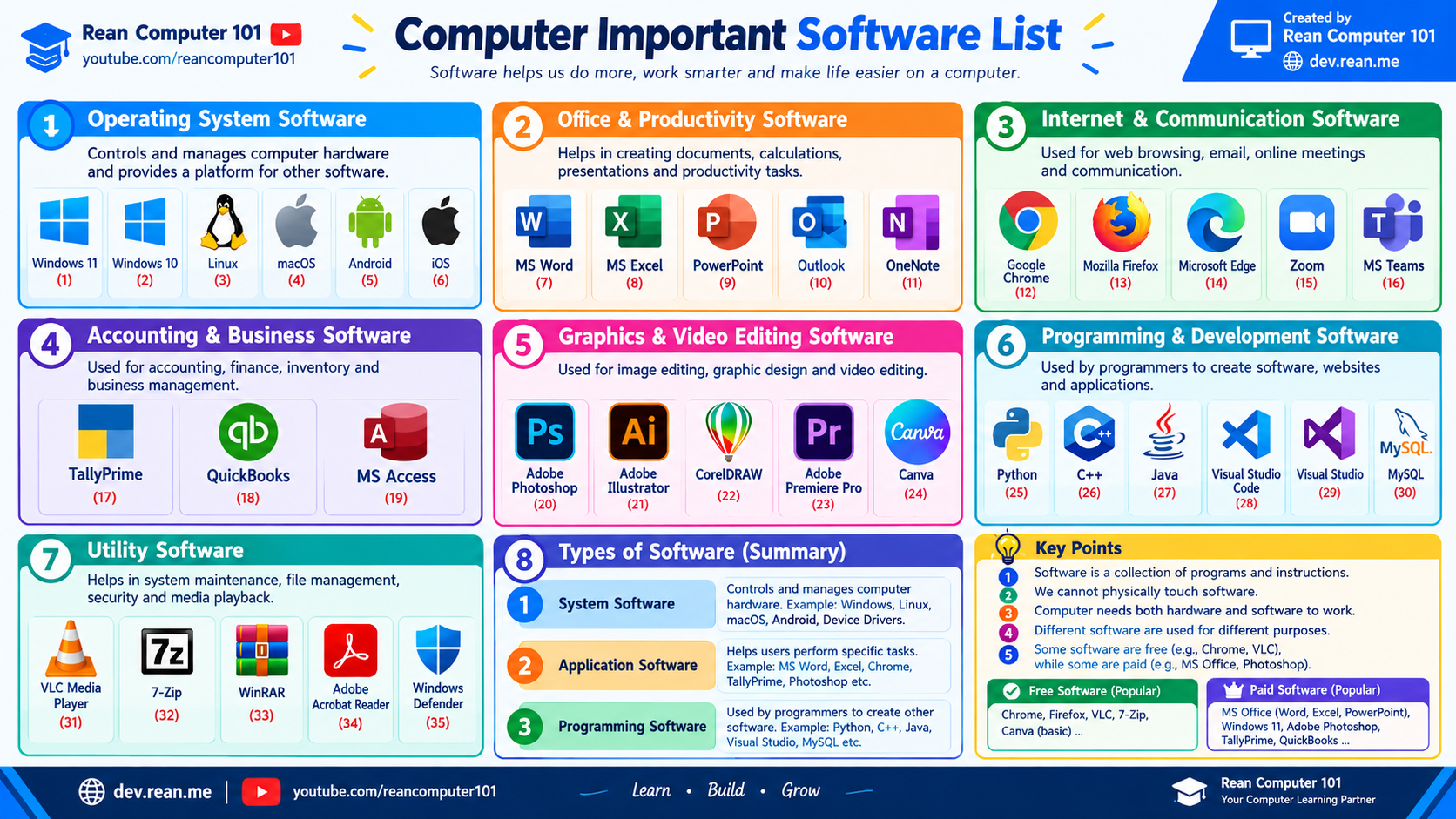
🖥️ Main Types of Computer Software
Here are common software type you need know:
- 🖥️ Operating System (OS): System software to control computer hardware. Example: Windows, macOS, Linux, Android, iOS.
- 📖 Learn more: Windows Installation · Windows Configuration · Mobile, Linux and macOS · MS-DOS & Command Prompt
- ⚙️ Device Driver: Small software that help OS talk with hardware like printer, graphic card, Wi-Fi, and sound. No driver = device not work!
- 📖 Learn more: Printer Setup & Maintenance · Laptop and Mobile Configuration
- 📄 Office & Productivity: Create text document, spreadsheet, slide presentation, and manage email. Example: Word, Excel, PowerPoint, Outlook, LibreOffice.
- 📖 Learn more: Microsoft Outlook Mail Tutorial (Video in Khmer)
- 🌐 Web Browser & Internet: Open website and search info online. Example: Google Chrome, Brave, Edge, Firefox.
- 📖 Learn more: Networking Concepts · Applied Networking Fundamentals
- 💬 Communication & Meeting: Send message, email, voice, and video call. Example: Telegram, Discord, Zoom, Teams, Outlook.
- 📖 Learn more: Connect Gmail and use Outlook step by step
- 🎨 Graphics & Media: Design photo, edit video, and play music. Example: Photoshop, Illustrator, Canva, VLC, DaVinci Resolve.
- 📖 Learn more: Free media and design software with download link
- 👨💻 Programming & Development: Write code and build software application. Example: VS Code, Python, C++, Java, MySQL.
- 🛠️ Utility & Security: Keep computer safe, clean, and extract file. Example: 7-Zip, Notepad++, Windows Defender, Malwarebytes.
- 📖 Learn more: Computer Security & Malware · Preventive Maintenance
💡 Useful Tips for Computer Software
Tip 1: Always download software from official website only! Never download from random site — it can have virus or malware. (See Chapter 12 for more about virus.)
Tip 2: Update your software and Windows regularly to get security fix and new feature.
Tip 3: You not always need buy expensive software! Many great software are 100% free and safe (like VLC, 7-Zip, VS Code, LibreOffice).
Tip 4: Do not install too many startup software — it make your computer start up slow.
Tip 5: Always install driver from official website of hardware maker (like HP, Dell, Canon, NVIDIA). Wrong driver can make device not work.
Tip 6: Uninstall software you not use anymore. It free up disk space and keep computer clean. (See Preventive Maintenance.)
📌 Related Posts
- 🚀 Top 30 Free Software Applications for Windows 10/11 with Official Download Links
- 📧 Microsoft Outlook Mail Tutorial for Beginners (Video in Khmer)
- 📚 All Chapters of Computer Fundamentals & IT Essentials
- 🛡️ Chapter 12 - Computer Security, Malware & Antivirus Guide
- ⚙️ Chapter 5 - Introduction to Windows Installation & Operating Systems
- 🐧 Chapter 10 - Mobile, Linux and macOS Operating Systems
- 💻 Chapter 13 - Introduction to MS-DOS & Windows Command Prompt
#ComputerSoftware #Software #ComputerBasics #Windows #FreeSoftware #ITEssentials