Student Management Database (MySQL) Example with Enrollment and Payment (video inside)
In this video, we create simple student management database step-by-step from scratch, including students table, courses table, enrollments, and payment tracking. Includes SQL queries for enrollment and payment operations.
2026-08-24 · 9 min read
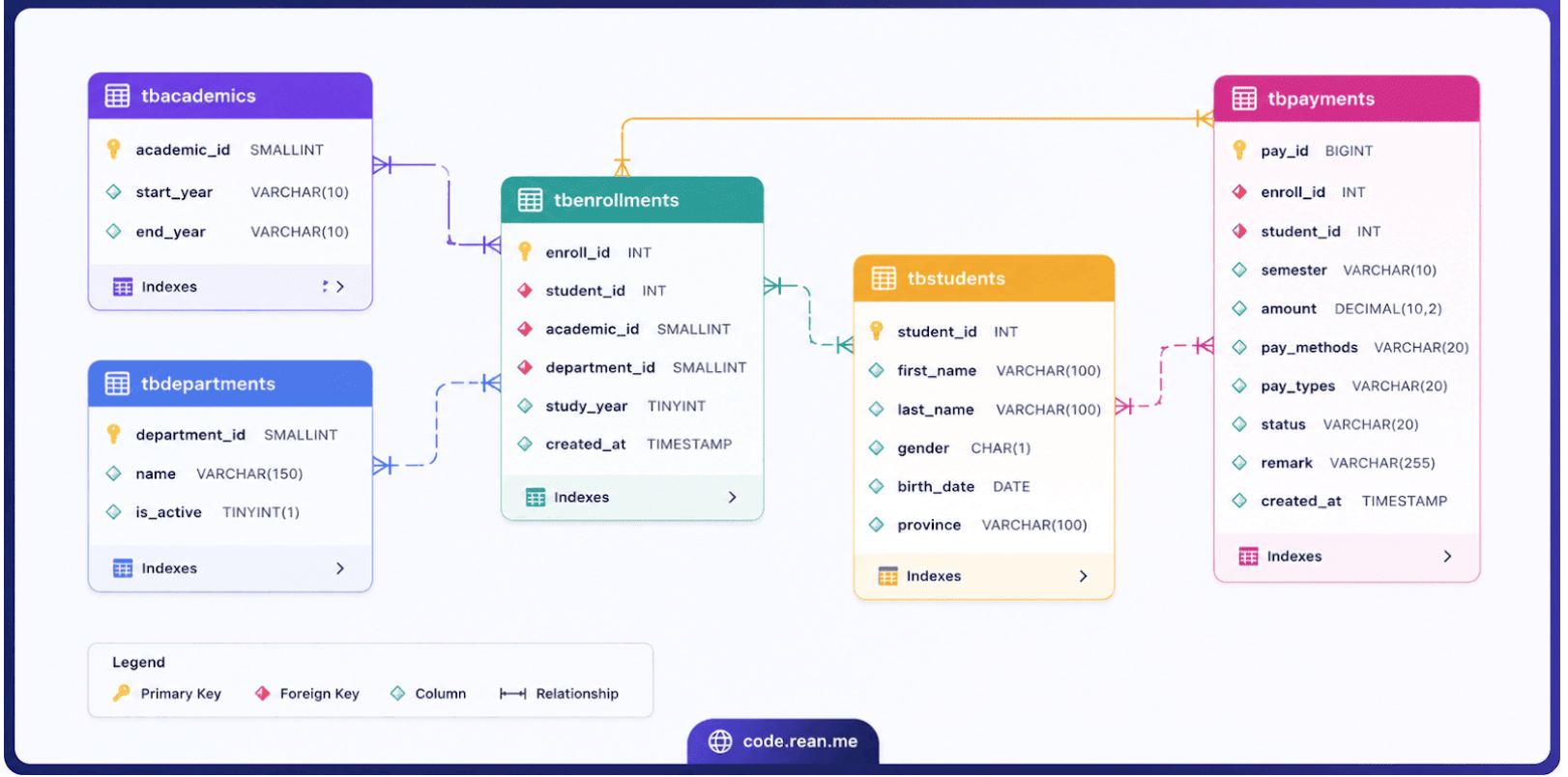
Hello friend! Today we create simple student management database step by step from scratch. This database help us keep and manage student info, department, academic year, enrollment, and payment history.
All SQL query here write specifically for MySQL database. If you use SQL Server or PostgreSQL, syntax can be a little bit different, but main idea and logic is same!
The same example for SQL Server: Student Management Database Example in SQL Server with Video in Khmer
💡 Tip: Make sure your MySQL Server and MySQL Workbench or phpMyAdmin is running before you execute query!
Step 1: Create Database
First step, we must create one database for hold all our tables. We call it StudentManagementDB.
CREATE DATABASE StudentManagementDB;

USE StudentManagementDB;
💡 Tip: Always run
USE StudentManagementDB;first so MySQL know you want to work inside this database!
Step 2: Create Student Table (tbStudents)
Now, we make table to keep student basic information like name, gender, birth date, and province. We call it tbStudents.
CREATE TABLE tbStudents(
    student_id INT PRIMARY KEY,
    first_name VARCHAR(100),
    last_name VARCHAR(100),
    gender CHAR(1),
    birth_date DATE,
    province VARCHAR(100)
);
Create Student Table and Insert Data Video Tutorial
Now let insert some sample student data into table:
INSERT INTO tbStudents (student_id, first_name, last_name, gender, birth_date, province)
VALUES (1, 'sok', 'sao', 'M', '2000-1-23', 'Kampot');

INSERT INTO tbStudents
VALUES (2, 'sokheng', 'Sou', 'M', '2002-4-13', 'Takeo');

INSERT INTO tbStudents VALUES
(3, 'Vanna', 'Sokha', 'M', '2003-01-10', 'Takeo'),
(4, 'Srey', 'Pich', 'F', '2002-11-05', 'Kampong Cham'),
(5, 'Rithy', 'Chantha', 'M', '2000-06-30', 'Battambang'),
(6, 'Sokun', 'Sophea', 'F', '2001-09-12', 'Siem Reap'),
(7, 'Dara', 'Vichea', 'M', '2002-04-18', 'Prey Veng'),
(8, 'Sreynich', 'Ly', 'F', '2003-02-25', 'Svay Rieng'),
(9, 'Borey', 'Kim', 'M', '2001-12-01', 'Kampot'),
(10, 'Sreyneang', 'Huot', 'F', '2002-08-09', 'Kep'),
(11, 'Piseth', 'Meng', 'M', '2000-05-20', 'Kampong Speu'),
(12, 'Sokunthea', 'Chea', 'F', '2001-10-14', 'Kampong Thom'),
(13, 'Narin', 'Phan', 'M', '2002-07-07', 'Pursat'),
(14, 'Sreymao', 'Tan', 'F', '2003-03-11', 'Koh Kong'),
(15, 'Visal', 'Heng', 'M', '2001-01-29', 'Banteay Meanchey'),
(16, 'Sopheap', 'Oun', 'F', '2002-06-16', 'Oddar Meanchey'),
(17, 'Kosal', 'Lim', 'M', '2000-09-03', 'Pailin'),
(18, 'Sreyka', 'Sin', 'F', '2003-05-22', 'Ratanakiri'),
(19, 'Chenda', 'Long', 'M', '2002-12-19', 'Mondulkiri'),
(20, 'Sreylen', 'Keo', 'F', '2001-04-27', 'Kratie'),
(21, 'Vichea', 'Touch', 'M', '2000-11-13', 'Stung Treng'),
(22, 'Sokha', 'Yim', 'F', '2002-02-08', 'Preah Vihear'),
(23, 'Ratha', 'Nhem', 'M', '2001-06-17', 'Kampong Chhnang'),
(24, 'Sreypov', 'Chun', 'F', '2003-09-01', 'Tbong Khmum'),
(25, 'Bunna', 'Sam', 'M', '2002-10-10', 'Takeo'),
(26, 'Sreychan', 'Chhim', 'F', '2001-03-23', 'Kandal'),
(27, 'Dalin', 'Sok', 'F', '2002-07-30', 'Phnom Penh'),
(28, 'Sothea', 'Mean', 'M', '2000-08-05', 'Battambang'),
(29, 'Sreyroth', 'Prak', 'F', '2003-01-14', 'Siem Reap'),
(30, 'Phalla', 'Nuon', 'M', '2001-12-28', 'Kampot'),
(31, 'Sok', 'Dara', 'M', '2002-03-15', 'Phnom Penh'),
(32, 'Chan', 'Sreymom', 'F', '2001-07-21', 'Kandal');
💡 Tip:
student_idset as PRIMARY KEY. Every student must have unique ID number, duplicate ID will fail!
Step 3: Create Academic Year Table (tbAcademic_years)
Now we make table for academic year like 2025 to 2026, 2026 to 2027.
CREATE TABLE tbAcademic_years(
    academic_id TINYINT AUTO_INCREMENT PRIMARY KEY,
    start_year VARCHAR(4), -- 2026
    end_year VARCHAR(4)   -- 2027
);
Create Academic Year Table and Insert Data Video Tutorial
Let insert sample data:
INSERT INTO tbAcademic_years (start_year, end_year)
VALUES (2025, 2026), (2026, 2027), (2027, 2028), (2028, 2029);
💡 Tip: We use
AUTO_INCREMENTcolumn so MySQL auto increase ID (1, 2, 3...) when we add new record!
Step 4: Create Department Table (tbDepartments)
What department student study? Computer Science? Khmer Literature? Math? We make tbDepartments table to store department list.
CREATE TABLE tbDepartments(
    department_id SMALLINT AUTO_INCREMENT PRIMARY KEY,
    name VARCHAR(255) NOT NULL,
    is_active TINYINT(1) DEFAULT 1,
    created_at TIMESTAMP DEFAULT CURRENT_TIMESTAMP,
    updated_at TIMESTAMP DEFAULT CURRENT_TIMESTAMP ON UPDATE CURRENT_TIMESTAMP
);
Create Department Table and Insert Data Video Tutorial
Let insert sample department data:
INSERT INTO tbDepartments (name)
VALUES ('Computer Science'), ('Khmer Literature'), ('Enligh Language'), ('Mathematics'), ('Physics'), ('Chemistry');
💡 Tip:
DEFAULT CURRENT_TIMESTAMPautomatically saves exact date and time when new row is created!
Step 5: Create Enrollment Table (tbEnrollments)
Now we make enrollment table which record student study in which department and academic year. It has relation with student, department, and academic year table using Foreign Key.
CREATE TABLE tbEnrollments(
    enroll_id INT AUTO_INCREMENT PRIMARY KEY,
    student_id INT NOT NULL, -- FK
    academic_id TINYINT NOT NULL, -- FK
    department_id SMALLINT NOT NULL, -- FK
    study_year TINYINT NOT NULL,
    is_active TINYINT(1) DEFAULT 1,
    created_at TIMESTAMP DEFAULT CURRENT_TIMESTAMP,
    updated_at TIMESTAMP DEFAULT CURRENT_TIMESTAMP ON UPDATE CURRENT_TIMESTAMP,
    FOREIGN KEY (student_id) REFERENCES tbStudents (student_id)
        ON DELETE CASCADE ON UPDATE CASCADE,
    FOREIGN KEY (academic_id) REFERENCES tbAcademic_years (academic_id)
        ON DELETE CASCADE ON UPDATE CASCADE,
    FOREIGN KEY (department_id) REFERENCES tbDepartments (department_id)
        ON DELETE CASCADE ON UPDATE CASCADE
);
Create Enrollment Table and Insert Data Video Tutorial
Now let insert sample enrollment data:
INSERT INTO tbEnrollments (student_id, academic_id, department_id, study_year)
VALUES (1,1,1,1), (2,1,1,2), (3,1,2,1), (4,2,1,1), (5,1,1,2), (6,1,1,1), (7,1,1,2), (8,1,2,2), (9,1,2,2);

INSERT INTO tbEnrollments (student_id, academic_id, department_id, study_year)
VALUES (1,1,3,1), (2,1,2,2), (3,1,1,1);
💡 Tip:
ON DELETE CASCADEmeans if student row deleted, all enrollment of that student also deleted automatically!
Step 6: Create Payment Table (tbPayments)
After student enrolled in department, they must pay money for tuition fee, transcript, or exam. We make tbPayments table for manage all payment history.
CREATE TABLE tbPayments(
    payment_id BIGINT AUTO_INCREMENT PRIMARY KEY,
    enroll_id INT NOT NULL, -- FK
    student_id INT NOT NULL, -- FK
    semester ENUM('first', 'second', 'full'),
    amount DECIMAL(10,2) CHECK (amount > 0) NOT NULL,
    payment_methods ENUM('cash', 'bank', 'KHQR', 'Other') NOT NULL,
    payment_types ENUM('tuition', 'exam', 'transcript', 'other') NOT NULL,
    status ENUM('paid', 'pending', 'refund') DEFAULT 'pending',
    remark VARCHAR(255),
    is_deletd TINYINT(1) DEFAULT 0,
    created_at TIMESTAMP DEFAULT CURRENT_TIMESTAMP,
    updated_at TIMESTAMP DEFAULT CURRENT_TIMESTAMP ON UPDATE CURRENT_TIMESTAMP,
    FOREIGN KEY (student_id) REFERENCES tbStudents (student_id)
        ON DELETE CASCADE ON UPDATE CASCADE,
    FOREIGN KEY (enroll_id) REFERENCES tbEnrollments (enroll_id)
        ON DELETE CASCADE ON UPDATE CASCADE
);
Create Payment Table and Insert Data Video Tutorial
Now insert sample payment data:
INSERT INTO tbPayments
(enroll_id, student_id, semester, amount, payment_methods, payment_types, status, remark) VALUES
(1, 1, 'first', 250.00, 'cash', 'tuition', 'paid', 'First semester tuition fee'),
(2, 2, null, 10, 'cash', 'transcript', 'paid', null);

INSERT INTO tbPayments (enroll_id, student_id, semester, amount, payment_methods, payment_types, status, remark) VALUES
(1, 1, 'first', 250.00, 'bank', 'tuition', 'paid', 'First semester tuition fee'),
(2, 2, 'first', 250.00, 'KHQR', 'tuition', 'paid', 'First semester tuition fee'),
(3, 3, 'first', 250.00, 'cash', 'tuition', 'pending', 'Awaiting payment'),
(4, 4, 'first', 250.00, 'bank', 'tuition', 'paid', 'Full payment'),
(5, 5, 'first', 250.00, 'KHQR', 'tuition', 'paid', 'Full payment'),
(1, 1, NULL, 15.00, 'cash', 'transcript', 'paid', 'Official transcript request'),
(2, 2, NULL, 20.00, 'cash', 'other', 'paid', 'ID card replacement fee'),
(6, 6, 'first', 250.00, 'bank', 'tuition', 'paid', 'Full payment'),
(7, 7, 'first', 100.00, 'cash', 'tuition', 'pending', 'Partial payment'),
(8, 8, NULL, 5.00, 'cash', 'exam', 'paid', 'Resit exam fee'),
(3, 3, 'first', 500.00, 'bank', 'tuition', 'paid', 'First semester tuition fee'),
(4, 4, 'first', 250.00, 'KHQR', 'tuition', 'pending', 'First installment'),
(5, 5, 'first', 500.00, 'bank', 'tuition', 'paid', 'Full payment for first semester'),
(6, 6, 'first', 500.00, 'cash', 'tuition', 'paid', 'Full payment'),
(7, 7, 'second', 500.00, 'KHQR', 'tuition', 'paid', 'Second semester tuition fee'),
(8, 8, NULL, 25.00, 'cash', 'exam', 'paid', 'Resit exam fee'),
(9, 9, 'first', 500.00, 'bank', 'tuition', 'paid', 'Full payment'),
(10, 1, 'second', 500.00, 'KHQR', 'tuition', 'pending', 'Awaiting payment for second semester'),
(11, 2, NULL, 15.00, 'cash', 'other', 'paid', 'Library fine'),
(12, 3, NULL, 10.00, 'cash', 'transcript', 'paid', 'Transcript request');
💡 Tip: We use
DECIMAL(10,2)datatype for money amount to prevent calculation error on float values!
SQL Practice Questions & Video Tutorials
Now we have database, tables, and sample data ready. Let try to write some SQL query to test your knowledge!
10 Basic SQL Questions and Answers
In this video, you will learn 10 basic SQL questions and answers using Student Management Database to practice fundamental SQL query.
💡 Tip: Try to solve the queries by yourself first before watching the answer!
Another 10 SQL Questions and Answers
In this video, you will learn another 10 SQL questions to strengthen your query skill.
5 Advance SQL Questions and Answers
In this video, we cover advance SQL query like JOIN, joining multiple tables together, and SUBQUERY.
Complex 5 Advance SQL Questions and Answers
In this video, we cover complex advance SQL query with multi-table JOIN, GROUP BY, and subqueries.
💡 Tip: Master
JOINandGROUP BYis very important if you want to become pro in database development!