Employee Table Example in PostgreSQL with Video Tutorial (Khmer)
Step-by-step guide to create Employee table and insert sample data using PostgreSQL and write basic SQL queries. Video in Khmer.
2026-08-24 · 5 min read
Hello my friend! Today we continue database lesson together again! In this lesson, we will learn how to create Employee table in PostgreSQL (also call Postgres) and insert sample data into table. We also learn write basic SQL query like CREATE, INSERT, UPDATE, DELETE, and SELECT. All video tutorial in Khmer language, super easy to understand and practice follow!
PostgreSQL is very popular free and open-source database system. We use pgAdmin tool for write SQL query and manage database easy easy.

💡 Tip for Download: You can download PostgreSQL for free here: Download PostgreSQL official site
🔍 How to Increase Font Size in pgAdmin
If you open pgAdmin and text size look too small, don't worry my friend! You can zoom in text very easy.
💡 Tip for pgAdmin Font: Press
Ctrl++on keyboard to make font bigger, or pressCtrl+-to make font smaller! Or change in pgAdmin Preferences settings.
📺 Watch Video Guide:
1. How to CREATE Table Employee
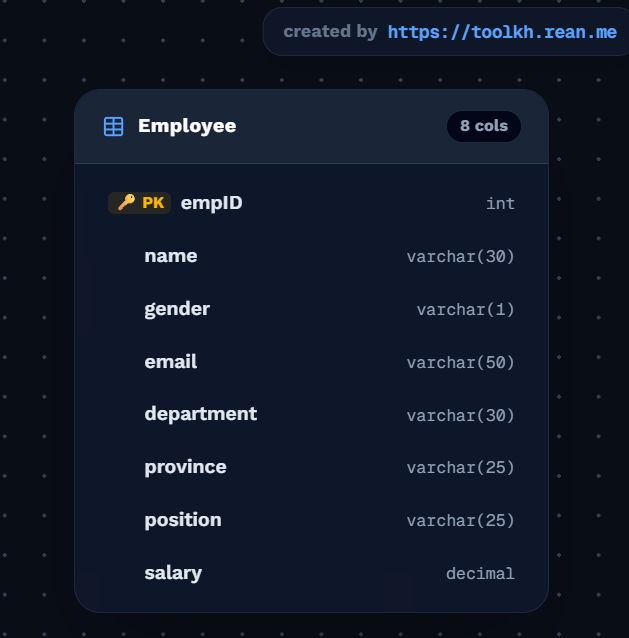
First step, we must create Employee table in database with columns like empID, name, gender, email, department, province, position, and salary.
CREATE TABLE Employee(
	empID int PRIMARY KEY,
	name varchar(30),
	gender varchar(1),
	email varchar(50),
	department varchar(30),
	province varchar(25),
	position varchar(25),
	salary decimal(10, 2)
);
💡 Tip for Primary Key:
empID int PRIMARY KEYmeans every employee must have unique ID number. Cannot insert 2 employees with sameempID!
📺 Watch Video Tutorial for CREATE Table:
2. How to INSERT Data into Employee Table
After table created, we put sample employee data into table using INSERT INTO statement.
INSERT INTO employee VALUES
    (1, 'Sovan', 'M', 'Sovan@gmail.com', 'IT', 'Phnom Penh', 'Developper', 450),
    (2, 'vutha', 'M', 'vutha@outlook.com', 'IT', 'Phnom Penh', 'Senior Developper', 650),
    (3, 'sokha', 'F', 'sokha@gmail.com', 'Media', 'Battambong', 'Design', 500),
    (4, 'nimol', 'F', 'nimol@outlook.com', 'Media', 'Takeo', 'Senior Design', 600),
    (5, 'rim', 'M', 'rim@gmail.com', 'Account', 'Kampot', 'Account', 550),
    (6, 'nisan', 'M', 'nisan@outlook.com', 'Account', 'Posat', 'Head Account', 850);

INSERT INTO employee VALUES (7, 'sok', 'M', 'sok@outlook.com', 'Account', 'Posat', 'Head Account', 850);
INSERT INTO employee VALUES (8, 'sao', 'M', 'sok@outlook.com', 'Account', 'Posat', 'Head Account', 850);
💡 Tip for String Data: In SQL, string text value like
'Sovan'or'Phnom Penh'must wrap with single quotes' '. Numbers do not need quotes!
📺 Watch Video Tutorial for INSERT Data:
3. How to UPDATE Data in Employee Table
When employee get salary promotion or change position, we use UPDATE command with WHERE condition.
-- Update salary for employee ID 7 to 450
UPDATE employee
SET salary = 450
WHERE empID = 7;

-- Update position and salary for employee ID 8
UPDATE employee
SET "position" = 'Account assistant', salary = 470
WHERE empID = 8;
⚠️ VERY IMPORTANT TIP: Always remember write
WHEREclause! If you forgetWHERE empID = 8, SQL will update salary and position for ALL employees in database! Be careful my friend!
📺 Watch Video Tutorial for UPDATE Data:
4. How to DELETE Data from Employee Table
If employee leave company, we can remove employee row using DELETE FROM command.
-- Delete single employee with ID = 8
DELETE FROM employee WHERE empID = 8;

-- WARNING: This command delete ALL data in employee table!
-- DELETE FROM employee;
💡 Tip for DELETE: Always check your
WHEREcondition twice before executeDELETEstatement so you don't delete wrong data by mistake!
📺 Watch Video Tutorial for DELETE Data:
5. How to SELECT & Query Data from Employee Table
We use SELECT command to search and display data from table based on conditions.
-- 1. Show all employee records from table
SELECT * FROM employee;

-- 2. Show only employees working in IT department
SELECT * FROM employee WHERE department = 'IT';

-- 3. Show employees who do NOT live in Phnom Penh province
SELECT * FROM employee WHERE province != 'Phnom Penh';

-- 4. Show name, gender, and position of female employees only
SELECT name, gender, position FROM employee WHERE gender = 'F';
💡 Tip for SELECT Filter:
!=symbol means "Not Equal to". You can also write<>in SQL standard for not equal.*symbol means select all columns!
📺 Watch Video Tutorial for SELECT Queries:
Happy learning SQL with PostgreSQL my friend! If you have any question, drop comment below! See you in next lesson! 🚀