01-Library Database Example - Create Tables with Data Download (Video in Khmer)
Step-by-step guide to create tables with data download for a library database using MySQL with video tutorial in Khmer.
2026-08-22 · 3 min read
Hello my friend! Today we learn together small sample project call Library Database.
This Library Database working on MySQL Server with MySQL Workbench tool. We will create 5 tables with relationship, generate ER Diagram, and insert data into database. Video tutorial is in Khmer language, very easy to follow! Now let get start!
ERD Diagram - Table Relationship
Here is the ER Diagram of our Library Database. It show how 5 tables connect together:
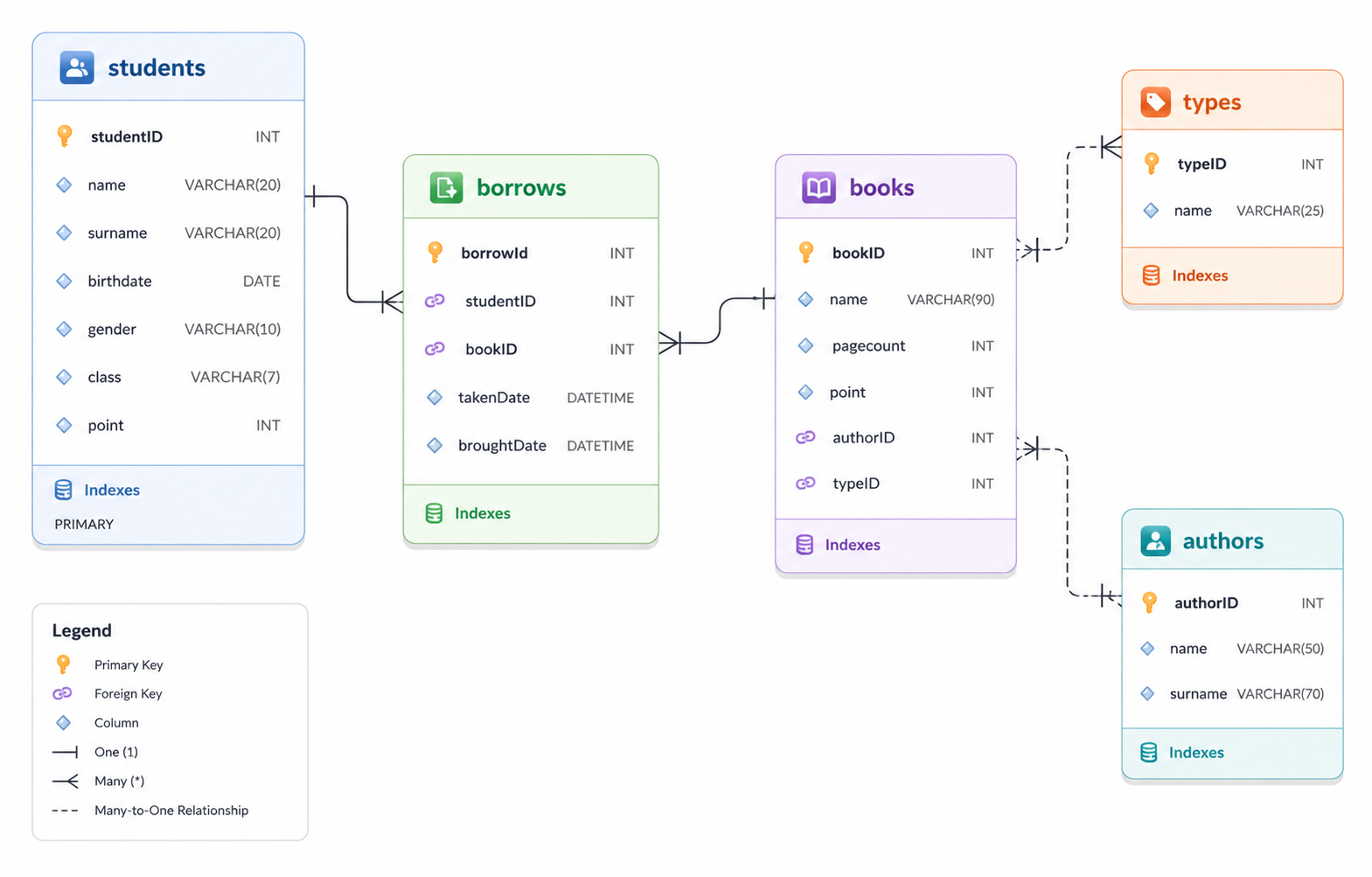
Explanation of 5 Tables:
authors— store author name and informationtypes— store category or type of book (Science, Romance, Drama...)books— store book title, page count, and link to author and typestudents— store student info who borrow bookborrows— transaction table to record which student borrow which book and when return
Part 1: Create Basic Tables in MySQL Workbench
In this first part, we write SQL statement to create 3 independent tables: students, authors, and types.
Watch video tutorial (Part 1):
SQL Code for Part 1:
-- Table 1: students
CREATE TABLE students(
	studentID int PRIMARY KEY NOT NULL,
	name varchar(20) NULL,
	surname varchar(20) NULL,
	birthdate date NULL,
	gender varchar(10) NULL,
	class varchar(7) NULL,
	point int NULL
);

-- Table 2: authors
CREATE TABLE authors(
	authorID int PRIMARY KEY NOT NULL,
	name varchar(50) NULL,
	surname varchar(70) NULL
);

-- Table 3: types
CREATE TABLE types(
	typeID int PRIMARY KEY NOT NULL,
	name varchar(25) NULL
);
Part 2: Create Tables with Foreign Key Relationship
Now we create 2 more tables: books and borrows. These table need Foreign Key to link with original table primary key.
Watch video tutorial (Part 2):
SQL Code for Part 2:
-- Table 4: books (relates to authors and types)
CREATE TABLE books(
	bookID int PRIMARY KEY NOT NULL,
	name varchar(90) NULL,
	pagecount int NULL,
	point int NULL,
	authorID int,
	typeID int,
	CONSTRAINT FkauthorID FOREIGN KEY(authorID) REFERENCES authors(authorID),
	CONSTRAINT FktypeID FOREIGN KEY(typeID) REFERENCES types(typeID)
);

-- Table 5: borrows (relates to students and books)
CREATE TABLE borrows(
	borrowId int PRIMARY KEY NOT NULL,
	studentID int NULL,
	bookID int NULL,
	takenDate datetime NULL,
	broughtDate datetime NULL,
	CONSTRAINT fkstudentID FOREIGN KEY(studentID) REFERENCES students(studentID),
	CONSTRAINT fkbookID FOREIGN KEY(bookID) REFERENCES books(bookID)
);
Part 3: Generate ER Diagram & Insert Sample Data
In this last part, we generate ER Diagram inside MySQL Workbench and insert sample data into all tables.
Watch video tutorial (Part 3):
⬇️ Download Sample SQL Data File
You no need type all insert data manually! Click link below to download full SQL file:
⬇️ Download Library Sample Data (.sql file)💡 Tip for Database Beginner: Always create parent tables (
authors,types,students) BEFORE you create child tables (books,borrows)! Why? Because child tables need Foreign Key to point to parent Primary Key. If parent table not exist yet, MySQL will show error message!